
We were tasked to create a Cookie Clicker game within the software “Unity”.
Link to the game: https://qkayy.itch.io/dumpling-clicker

My inspiration for my version of the Cookie Clicker is my love for dumplings. Following on from my previous artworks that I created, I wanted to maintain the Chinese-inspired trend which helped enforce my ideas for the dumpling clicker. The artwork for the upgrade button was inspired by my dad who is the very person who taught me how to make dumplings!
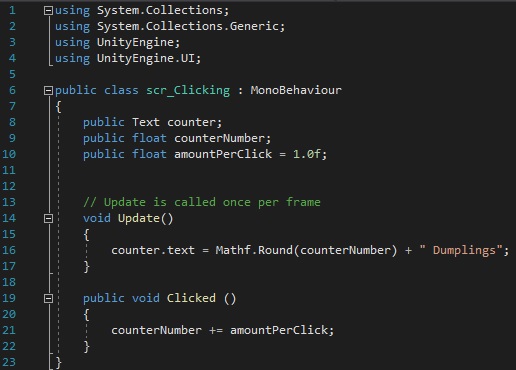
The first script that I needed to create was the code which counted the number of clicks that the player has clicked. The code also integrates the amount of clicks and displays it onto a UI text. This informs the player of the amount of dumplings that they have created through number of clicks that they did.
To ensure that the code works correctly, because I implemented a UI object (and am assigning a script to said object) I needed to add “using UnityEngine.UI;” to my script; by adding this line of code, my script is able to work with UI within Unity.
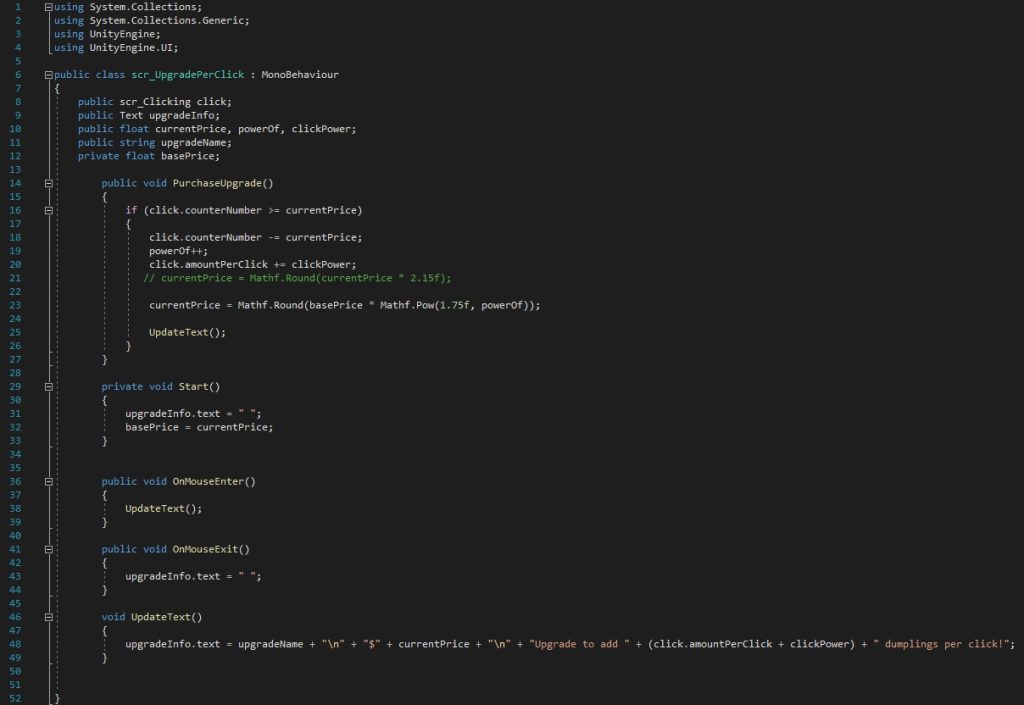
After I wrote the clicking script, I needed to create a script for an upgrade. The function of the upgrade script is to allow the player to purchase an item to increase the amount of dumplings that they get per click. The if statement references the first script that we created (scr_Clicking) in order to check the amount of dumplings that the player currently has; if the player has enough dumplings to purchase the upgrade then the price of the upgrade would be taken from the player, thus subtracting the amount of dumplings and updating the counter text to display the updated number.
Furthermore, as an extra feature, the script includes a MouseEvent event (Unity, 2022), which has been added to inform the player of the details of the upgrade and display the information if the player hovers over the upgrade button. To ensure that the information text is not constantly showing, I needed to add the “OnMouseExit” (Unity, 2022) line of code with an empty space between quotations marks.
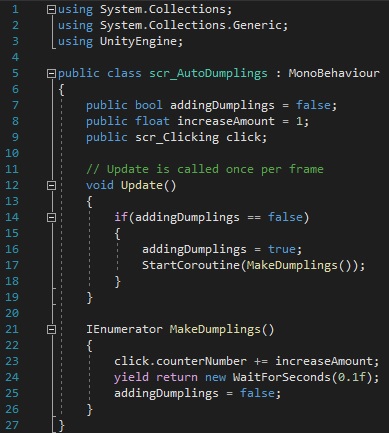
Another upgrade feature I added was an upgrade which enabled the player to purchase an item which allowed them to generate dumplings automatically. But to do this, we needed a way to generate dumplings at a set amount of time. This is when a new concept was introduced to me which was “Coroutine”. Coroutine allows me to start the auto generating dumplings and then wait for 0.1 seconds (as shown in the script) before returning to the if statement of “addingDumplings == false”.
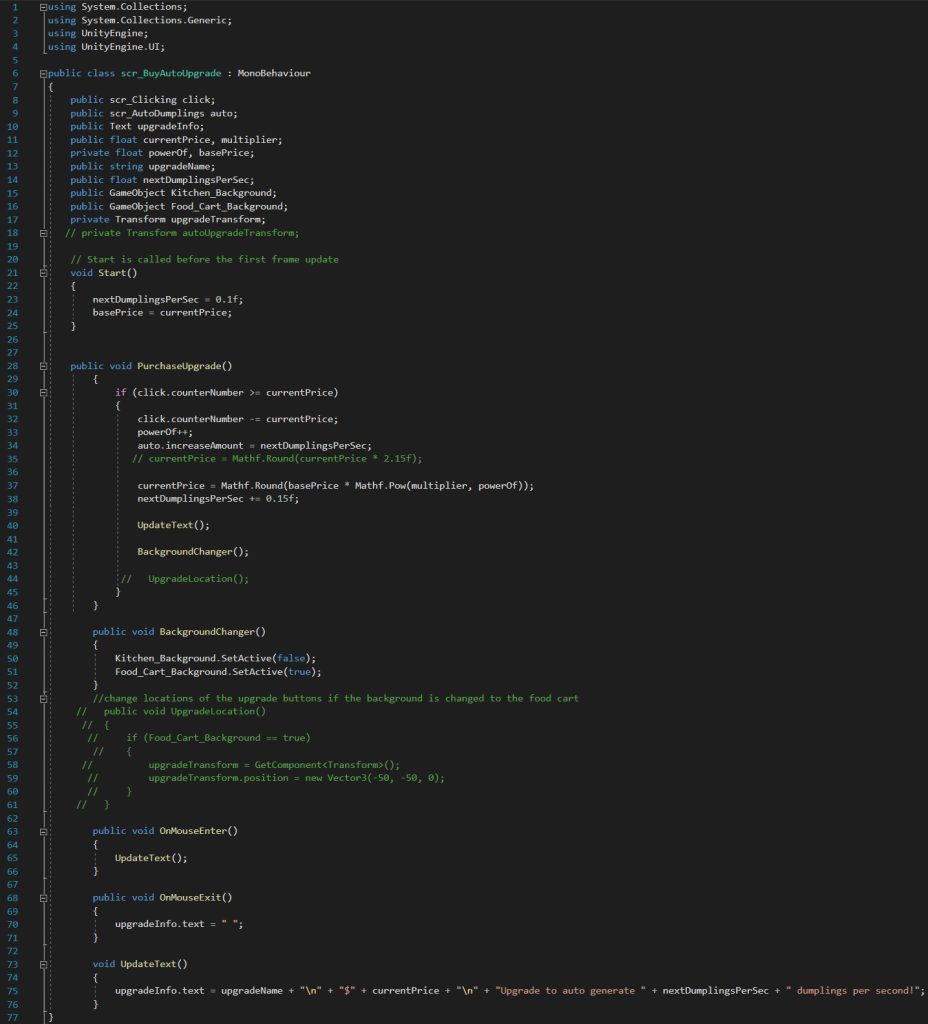
Following on from the script which auto generates the dumplings, I now need to create another script that allows the player to purchase the automatic upgrade. The code is fairly similar to the first upgrade button with a few alterations to the amount of auto generated dumplings.
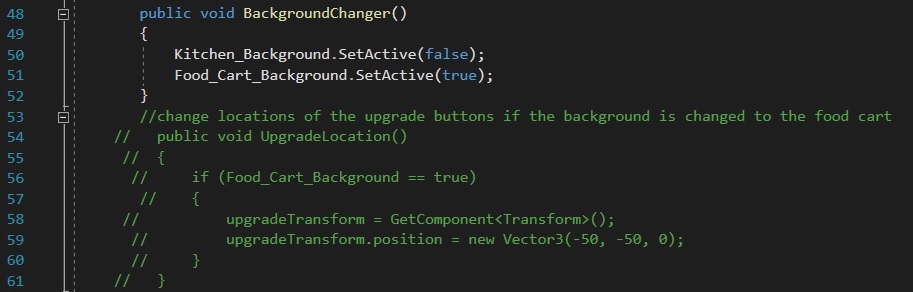
Once the game had been completed, I decided to add a couple extra features to my game. One of the features include a switch in background once an upgrade purchase has been made; during the process of coding, I came across a problem where the background would change whenever the upgrade button was clicked, however, this was quickly solved as I had mistakenly added the function upon click. As the code for the change in background was already in the script, it was unnecessary for me to add the function upon click.
As shown in the above screenshot, the text in green was an attempt to change the locations of the upgrade buttons as they stayed in the same position once the background had been changed. This meant that the upgrade buttons looked out of place, so I attempted to change the locations with an experimental code. Unfortunately, it did not work; therefore, I relocated the upgrade buttons to the centre of the game.
To improve on the finished game, I would like to add more upgrade buttons. I feel as though there are not that many upgrades that the player can purchase, which can feel quite tedious to play through. In addition, after testing the game, I figured that the current appearance of the upgrade buttons could look a little more like a button; this is because the sprites blended in with the rest of the background so it was difficult to locate where the upgrade buttons actually were. Moreover, I would also like to work on the code with changing the locations of the upgrade buttons so that the appearance of the game runs smoothly with the change of the background. And finally, include more audio!
Unity (2022) MonoBehaviour.OnMouseEnter(). Available online: https://docs.unity3d.com/ScriptReference/MonoBehaviour.OnMouseEnter.html [Accessed 24/11/22].
Unity (2022) MonoBehaviour.OnMouseExit(). Available online: https://docs.unity3d.com/ScriptReference/MonoBehaviour.OnMouseExit.html [Accessed 24/11/22].
Font Used:
https://www.dafont.com/chow-fun.font